

• Home
  • Startup
  • Money & Finance
  • Starting a Business
    • Branding
    • Business Ideas
    • Business Models
    • Business Plans
    • Fundraising
  • Growing a Business
  • More
    • Innovation
    • Leadership
Trending

Why Conversational Commerce is the Future of Shopping

May 29, 2025

10 Leadership Myths You Need to Stop Believing

May 29, 2025

Tesla’s Layoffs Won’t Solve Its Growing Pains

May 29, 2025
Facebook Twitter Instagram
  • Newsletter
  • Submit Articles
  • Privacy
  • Advertise
  • Contact
Facebook Twitter Instagram
InDirectica
  • Home
  • Startup
  • Money & Finance
  • Starting a Business
    • Branding
    • Business Ideas
    • Business Models
    • Business Plans
    • Fundraising
  • Growing a Business
  • More
    • Innovation
    • Leadership
Subscribe for Alerts
InDirectica
Home » How To Reset AirPods Or AirPods Pro
Innovation

How To Reset AirPods Or AirPods Pro

adminBy adminAugust 14, 20230 ViewsNo Comments3 Mins Read
Facebook Twitter Pinterest LinkedIn Tumblr Email

Topline

AirPods and AirPods Pro can be used for a variety of things, like watching a movie, listening to music or reading an audiobook—here’s how to reset them if you’re having issues.

Key Facts

AirPods or AirPods Pros may need to be reset if there’s an issue charging or connecting to a device, for example.

You can reset your AirPods or AirPods Pro even if you don’t have the Apple device you’ll be using them on with you.

Before resetting AirPods or AirPods Pro that have been used by someone else and connecting them to a device, first ensure that the previous person removes them from their Apple ID.

How To Reset Airpods Or Airpods Pro

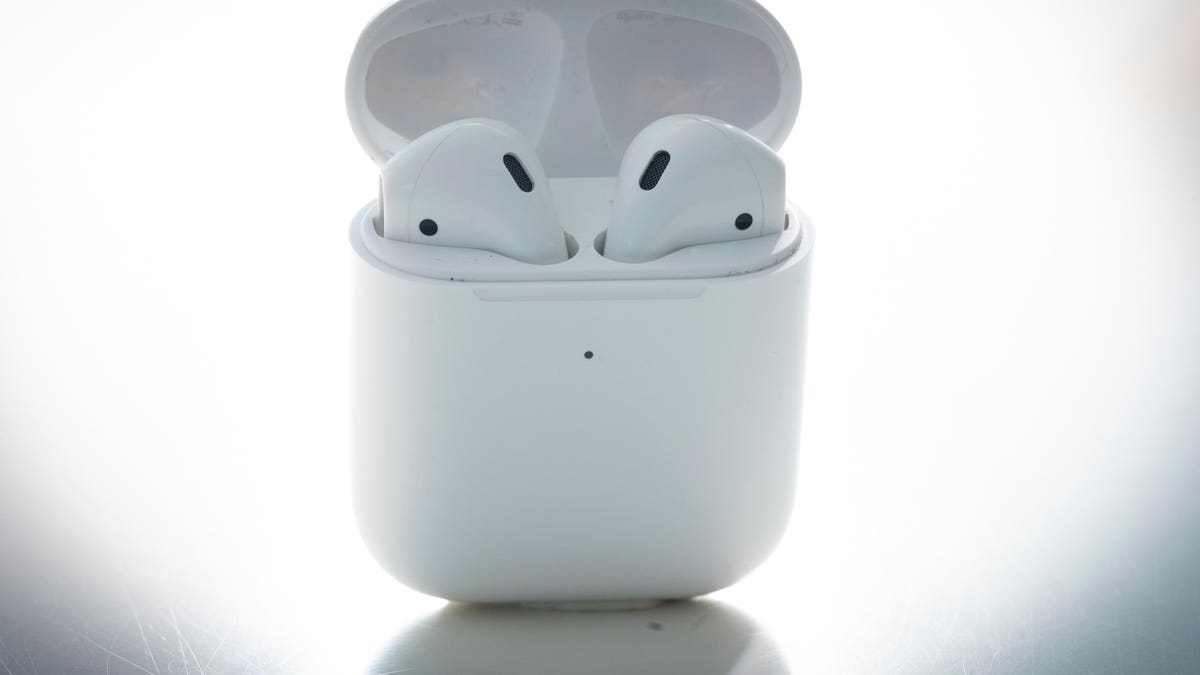
To reset your AirPods or AirPods Pro, first make sure both earbuds are in the charging case and then wait 30 seconds. Next, open the charging case lid and put the AirPods or AirPods Pro in your ear. Unlock your Apple device, go to Settings and click the Bluetooth tab. If your AirPods or AirPods Pro appear on the list, click the More Info button (ⓘ) next to them, select “Forget This Device,” then tap again to confirm. To reconnect your AirPods or AirPods Pro to your device, put them back in their charging case with the lid open and place them next to your Apple device. Next, follow the steps on your device’s screen as instructions may be different for different devices.

How To Reset Airpods Or Airpods Pros Without A Device

If you don’t have your Apple device nearby, there’s still a way to reset your AirPods or AirPods Pro without them. First, make sure they’re in their charging case and keep the lid open. Next, press and hold the button at the back of the case for 15 seconds, or until the status light flashes amber, then white. To reconnect your AirPods or AirPods Pro once your device is in range, make sure they’re in their charging case with the lid open and place them close to your Apple device. Next, follow the steps on your device’s screen—they may appear differently depending on device type.

Remove Airpods Or Airpods Pro From Apple Id

AirPods or AirPods Pro can only be associated with one Apple ID. If you want to use AirPods or AirPods Pro that have been used by someone else, they must first remove them from their Apple ID. To do that on an iPhone, iPad or iPod Touch, they must first open the Find My app on their Apple device. Next, click the Items tab and then the Devices tab. Once done, click the AirPods or AirPods Pro on the list of devices, select “Remove This Device,” then tap “Remove” to confirm. To remove AirPods or AirPods Pro from an Apple ID on a Mac, open the Find My app and click the Devices tab. On the map, click the More Info tab (ⓘ) and then click “Remove This Device.”

AirPods Pro: 7 Tips And Tricks To Master Apple’s Earbuds (Forbes)

Apple AirPods Pro (2022) Review: Familiar Look, Outstanding Sound (Forbes)

Read the full article here

Share. Facebook Twitter Pinterest LinkedIn Tumblr Email

Related Articles

Going Eco Benefits Planet And This Hotel’s Bottom Line

Innovation May 29, 2025

What IBM’s Deal For HashiCorp Means For The Cloud Infra Battle

Innovation April 25, 2024

Is Telepathy Possible? Perhaps, Due To New Technology

Innovation April 24, 2024

Luminar Launches Production For Volvo, Shows Next-Gen Halo Lidar

Innovation April 23, 2024

Turning Customers Into Investors – Tiny Health’s Experience

Innovation April 22, 2024

Netflix’s Best New Original Series Is Stressing Me Out

Innovation April 21, 2024
Add A Comment

Leave A Reply Cancel Reply

Editors Picks

Why Conversational Commerce is the Future of Shopping

May 29, 2025

10 Leadership Myths You Need to Stop Believing

May 29, 2025

Tesla’s Layoffs Won’t Solve Its Growing Pains

May 29, 2025

Going Eco Benefits Planet And This Hotel’s Bottom Line

May 29, 2025

What IBM’s Deal For HashiCorp Means For The Cloud Infra Battle

April 25, 2024

Latest Posts

The Future of Football Comes Down to These Two Words, Says This CEO

April 25, 2024

This Side Hustle Is Helping Land-Owners Earn Up to $60,000 a Year

April 25, 2024

A Wave of AI Tools Is Set to Transform Work Meetings

April 25, 2024

Is Telepathy Possible? Perhaps, Due To New Technology

April 24, 2024

How to Control the Way People Think About You

April 24, 2024
Advertisement
Demo

InDirectica is your one-stop website for the latest news and updates about how to start a business, follow us now to get the news that matters to you.

Facebook Twitter Instagram Pinterest YouTube
Sections
  • Growing a Business
  • Innovation
  • Leadership
  • Money & Finance
  • Starting a Business
Trending Topics
  • Branding
  • Business Ideas
  • Business Models
  • Business Plans
  • Fundraising

Subscribe to Updates

Get the latest business and startup news and updates directly to your inbox.

© 2026 InDirectica. All Rights Reserved.
  • Privacy Policy
  • Terms of use
  • Press Release
  • Advertise
  • Contact

Type above and press Enter to search. Press Esc to cancel.